Disclaimers (Important)
This guide is not intended to be an end-all-be-all hard-defined set rule to police people on how to enjoy and capture their games, but rather a guideline to follow as well as a resource that is easily accessible for those who wish to seek out this information.
The following will give you an accurate representation of the aspect ratio you will see on a perfectly calibrated CRT TV. Do keep in mind that CRT displays are old imperfect analog displays and likely haven’t been calibrated in 20 years, so what you may see on your CRT may not represent what you will see on a perfectly calibrated CRT.
If you have a RetroTINK-5X or a RetroTINK-4K, using Generic 4:3 or Generic 16:9 should give you the appropriate aspect ratio already, and it is what I recommend for most people. For RT4K users, there are even optimal profiles that have the appropriate aspect ratio correction for each console’s output mode as well. However, if you like to use optimal sampling to capture sharp pixels with the intention of correcting the aspect ratio in post, or if you are doing direct capture without the use of an external scaler, this guide is for you.
The final values given may result in a horizontal resolution that is not a whole number depending on how you upscale your game capture. You generally want to avoid uneven pixels to assure pixel uniformity so it is best practice to round to the nearest even pixel, but the value you round to could result in a final DAR that may differ depending on your scale factor. Aspect ratios are never 100% perfect, CRTs are not perfect displays, and there will always be “close enoughs” when it comes to aspect ratios from the analog era.
This guide will mainly be focused on NTSC, but I will update this page with complete information for PAL in the future.
UPDATE 2026/02/12: I have updated the math and final aspect ratio values to be more accurate. The previous misleading numbers were given under the assumption that you always need to round to the nearest even pixel, but this is something you should only do on the final possible output. The values I previously gave were rounded values assuming a 1x scale factor, but the more you increase the scale factor, the bigger the discrepancy between the accurate aspect ratio and the rounded aspect ratio from 1x. In short, the aspect ratio should be corrected on the final possible output to ensure maximum fidelity. Apologies for the previous inaccurate information.
Introduction and Explanation
Before we begin, I want to preface that there are three different types of aspect ratio, and it is important to know the difference between all three in order to understand how to do proper aspect ratio correction.
Pixel Aspect Ratio (PAR): The proportion of pixels in an image. Square pixels are 1:1, but game consoles don’t always output square pixels. We will get to that later.
Display Aspect Ratio (DAR): The proportion of the target screen display. For the context of retro consoles, you will only need to know the DAR of a standard definition CRT TV, which is 4:3. However, I will also be using DAR to refer to the proportions of a game’s active graphics when displayed on a CRT TV.
Storage Aspect Ratio (SAR): The relationship between the width and height of a video frame. For example, the SAR of a 256x224 video frame is 8:7. The SAR of a 320x240 video frame is 4:3. For the most part; if the SAR of a game is not 4:3 or doesn’t match the console’s PAR, it is safe to ignore it.
When it comes to aspect ratios for retro console games, it’s important to keep in mind that before the era of HDMI, they were designed to be displayed on analog consumer CRT TVs. To understand how DAR works on a CRT TV, it’s important to keep in mind that the horizontal resolution does not mean how many pixels wide the image is. It wasn’t until digital displays came along where horizontal resolution was interpreted as how many pixels wide an image is. CRT displays, on the other hand, do not have pixels. They instead display lines, as a literal electron beam from the back of a vacuum tube is drawing the image line by line. So instead of how many pixels wide the image is, the horizontal resolution determines how many samples are drawn per line. So even though a game’s resolution may output 512x224 or 640x240, it will still display as a 4:3 image because it’s the video signal’s dot clock rate that determines how the DAR gets corrected on a CRT TV.
There are two different camps that people often take when it comes to aspect ratio correction: one is to keep pixels square to have their game capture as sharp as possible, and the other is to have an accurate representation of what you see on a CRT TV. As mentioned before, most retro game consoles do not output square pixels. However when a game’s SAR matches with the console’s PAR, you get square pixels. Pin Eight has a page documenting the dot clock frequencies of each console, with calculations of their PAR included. To give an example: most NES games output a resolution of 256x224, which gives a SAR of 8:7. And according to Pin Eight, the dot clock frequency for the NES, SNES, and many other consoles from that generation is ~5.37MHz (Exact: 945/176 MHz). When dividing the NTSC square pixel clock rate of ~6.14 MHz for 240p (Exact: 135/22 MHz) by the console’s dot clock frequency, this equates to a PAR of ~1.143:1, or 8:7. So displaying a game in an integer scale of 256x224 in your game capture will give you square pixels. Easy, right? Well here’s where things get complicated. When you look at a game-by-game basis, you will notice that some SNES games had their geometry designed for square pixels, while other games accounted for how a CRT TV interpolates the image to a 4:3 frame. And when you get to later consoles like the GameCube, you will notice that the games were not designed to be viewed with square pixels at all. The point is: for some games, capturing in square pixels is perfectly valid. But for some other games, you will not have the intended geometry by capturing in square pixels. So you will have to judge by a game-by-game case whether square pixels are appropriate or not.
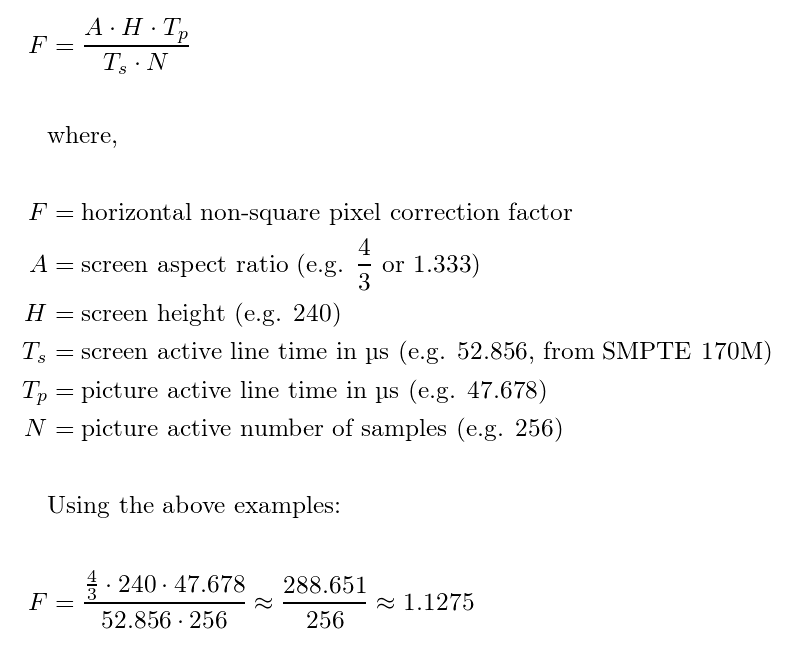
So what if you want your game capture to accurately represent what you see on a CRT TV? Well you just stretch it to 4:3 and call it a day, right? After all, that’s what actual CRT TVs do. They interpolate the image to 4:3, so that’s what I should do right? Well, that’s something that most people get wrong. Most people like to crop out the black borders surrounding the image, and then stretch the active game graphics to 4:3. While it is a convenient way to correct aspect ratio, it’s actually not accurate to what you see on a CRT. It’s not just the active game graphics that get interpolated to 4:3 on a CRT TV. It’s the active game graphics plus overscan padding. So how do you get the correct CRT-accurate aspect ratio in your game capture? Simple, FirebrandX came up with an easy formula that involves taking the horizontal resolution of a game, and multiplying it by the console’s PAR. Alternatively; you can multiply the vertical resolution by the PAR’s reciprocal so you can overscan into a standard 4:3 frame, and for consoles that follow the Rec. 601 standard (ie. the GameCube and Wii,) you don’t have to do any calculation whatsoever. You can just capture the 720x480 frame, crop the center to 704x480, and scale it to 4:3. Ste from HD Retrovision has a more complex formula, but for this guide we will be sticking with the FirebrandX formula. Do keep in mind that just like presenting games in square pixels, whether the in-game geometry will look correct or not will completely depend on the game. There are cases where if a game’s SAR is 4:3, that it’s actually desirable to retain its 4:3 aspect ratio, even if it’s not what you see on a CRT. From here on out, I will be giving details for each console on how to correct the aspect ratio for their perspective games.
NES/SNES
256px Games
Resolution (NTSC): 256x224
Storage Aspect Ratio (SAR): 8:7
Pixel Aspect Ratio (PAR): 8:7
4:3-adjusted DAR: 256 * (8/7) / 224 = 64:49
Resolution (NTSC): 256x240
Storage Aspect Ratio (SAR): 16:15
Pixel Aspect Ratio (PAR): 8:7
4:3-adjusted DAR (NTSC): 256 * (8/7) / 240 = 128:105
512px Games
Resolution (NTSC): 512x224
Storage Aspect Ratio (SAR): 16:7
Pixel Aspect Ratio (PAR): 4:7
4:3-adjusted DAR: 512 * (4/7) / 224 = 64:49
Resolution (NTSC): 512x240
Storage Aspect Ratio (SAR): 32:15
Pixel Aspect Ratio (PAR): 4:7
4:3-adjusted DAR: 512 * (4/7) / 240 = 128:105
Sega Master System
Resolution (NTSC): 256x192
Storage Aspect Ratio (SAR): 4:3
Pixel Aspect Ratio (PAR): 8:7
4:3-adjusted DAR: 256 * (8/7) / 192 = 32:21
PC-Engine/TurboGrafx-16
256px Games
Resolution (NTSC): 256x240
Storage Aspect Ratio (SAR): 16:15
Pixel Aspect Ratio (PAR): 8:7
4:3-adjusted DAR (NTSC): 256 * (8/7) / 240 = 128:105
352px Games
Resolution (NTSC): 352x240
Storage Aspect Ratio (SAR): 22:15
Pixel Aspect Ratio (PAR): 6:7
4:3-adjusted DAR (NTSC): 352 * (6/7) / 240 = 44:35
Sega Genesis
256px Games
Resolution (NTSC): 256x224
Storage Aspect Ratio (SAR): 8:7
Pixel Aspect Ratio (PAR): 8:7
4:3-adjusted DAR (NTSC): 256 * (8/7) / 224 = 64:49
320px Games
Resolution (NTSC): 320x224
Storage Aspect Ratio (SAR): 10:7
Pixel Aspect Ratio (PAR): 32:35
4:3-adjusted DAR (NTSC): 320 * (32/35) / 224 = 64:49
Neo Geo AES
Resolution (NTSC): 320x240
Storage Aspect Ratio (SAR): 4:3
Pixel Aspect Ratio (PAR): 65:64
4:3-adjusted DAR (NTSC): 320 * (65/64) / 240 = 65:48
PlayStation 1
Now we get to the console generation with games that run in various different resolutions. The PlayStation 1 has different dot clock rates for different horizontal resolution modes, and therefore result in different PARs which I will be listing below. The PS1 also has games that can output in 480i, but for the most part the 480i PAR is similar to their 240p counterparts as the NTSC dot clock for square interlaced pixels is ~12.27 MHz (Exact: 135/11 MHz), around double the rate of 240p NTSC square pixels. So if a game outputs 640x480i, the PAR is similar to a 320x240p game. Refer to this list to check your game’s resolution.
256px Games
Resolution (NTSC): 256x240
Storage Aspect Ratio (SAR): 16:15
Pixel Aspect Ratio (PAR): 8:7
4:3-adjusted DAR (NTSC): 256 * (8/7) / 240 = 128:105
320px Games
Resolution (NTSC): 320x240
Storage Aspect Ratio (SAR): 4:3
Pixel Aspect Ratio (PAR): 32:35
4:3-adjusted DAR (NTSC): 320 * (32/35) / 240 = 128:105
384px Games
Resolution (NTSC): 384x240
Storage Aspect Ratio (SAR): 16:10
Pixel Aspect Ratio (PAR): 4:5
4:3-adjusted DAR (NTSC): 384 * (4/5) / 240 = 32:25
512px Games
Progressive
Resolution (NTSC): 512x240
Storage Aspect Ratio (SAR): 32:15
Pixel Aspect Ratio (PAR): 4:7
4:3-adjusted DAR (NTSC): 512 * (4/7) / 240 = 128:105
Interlaced
Resolution (NTSC): 512x480i
Storage Aspect Ratio (SAR): 16:15
Pixel Aspect Ratio (PAR): 8:7
4:3-adjusted DAR (NTSC): 512 * (8/7) / 480 = 128:105
640px Games
Progressive
Resolution (NTSC): 640x240
Storage Aspect Ratio (SAR): 8:3
Pixel Aspect Ratio (PAR): 16:35
4:3-adjusted DAR (NTSC): 640 * (16/35) = / 240 = 128:105
Interlaced
Resolution (NTSC): 640x480i
Storage Aspect Ratio (SAR): 4:3
Pixel Aspect Ratio (PAR): 32:35
4:3-adjusted DAR (NTSC): 640 * (32/35) / 480 = 128:105
Sega Saturn
320px Games
Resolution (NTSC): 320x224
Storage Aspect Ratio (SAR): 10:7
Pixel Aspect Ratio (PAR): 32:35
4:3-adjusted DAR (NTSC): 320 * (32/35) / 224 = 64:49
Resolution (NTSC): 320x240
Storage Aspect Ratio (SAR): 4:3
Pixel Aspect Ratio (PAR): 32:35
4:3-adjusted DAR (NTSC): 320 * (32/35) / 240 = 128:105
352px Games
Resolution (NTSC): 352x224
Storage Aspect Ratio (SAR): 11:7
Pixel Aspect Ratio (PAR): 6:7
4:3-adjusted DAR (NTSC): 352 * (6/7) / 224 = 66:49
Resolution (NTSC): 352x240
Storage Aspect Ratio (SAR): 22:15
Pixel Aspect Ratio (PAR): 6:7
4:3-adjusted DAR (NTSC): 352 * (6/7) / 240 = 44:35
640px Games
Progressive
Resolution (NTSC): 640x224
Storage Aspect Ratio (SAR): 20:7
Pixel Aspect Ratio (PAR): 16:35
4:3-adjusted DAR (NTSC): 640 * (16/35) / 224 = 64:49
Resolution (NTSC): 640x240
Storage Aspect Ratio (SAR): 8:3
Pixel Aspect Ratio (PAR): 16:35
4:3-adjusted DAR (NTSC): 640 * (16/35) / 224 = 128:105
Interlaced
Resolution (NTSC): 640x448i
Storage Aspect Ratio (SAR): 10:7
Pixel Aspect Ratio (PAR): 32:35
4:3-adjusted DAR (NTSC): 640 * (32/35) / 448 = 64:49
Resolution (NTSC): 640x480i
Storage Aspect Ratio (SAR): 4:3
Pixel Aspect Ratio (PAR): 32:35
4:3-adjusted DAR (NTSC): 640 * (32/35) / 480 = 128:105
704px Games
Progressive
Resolution (NTSC): 704x224
Storage Aspect Ratio (SAR): 22:7
Pixel Aspect Ratio (PAR): 3:7
4:3-adjusted DAR (NTSC): 704 * (3/7) / 224 = 66:49
Resolution (NTSC): 704x240
Storage Aspect Ratio (SAR): 44:15
Pixel Aspect Ratio (PAR): 3:7
4:3-adjusted DAR (NTSC): 704 * (3/7) / 240 = 44:35
Interlaced
Resolution (NTSC): 704x448i
Storage Aspect Ratio (SAR): 11:7
Pixel Aspect Ratio (PAR): 6:7
4:3-adjusted DAR (NTSC): 704 * (6/7) / 448 = 66:49
Resolution (NTSC): 704x480i
Storage Aspect Ratio (SAR): 22:15
Pixel Aspect Ratio (PAR): 6:7
4:3-adjusted DAR (NTSC): 704 * (6/7) / 480 = 44:35
Nintendo 64
320px Games
Resolution (NTSC): 320x240
Storage Aspect Ratio (SAR): 4:3
Pixel Aspect Ratio (PAR): 120:119
4:3-adjusted DAR (NTSC): 320 * (120/119) / 240 = 160:119
640px Games
Progressive
Resolution (NTSC): 640x240
Storage Aspect Ratio (SAR): 4:3
Pixel Aspect Ratio (PAR): 60:119
4:3-adjusted DAR (NTSC): 640 * (60/119) / 240 = 160:119
Interlaced
Resolution (NTSC): 640x480i
Storage Aspect Ratio (SAR): 4:3
Pixel Aspect Ratio (PAR): 120:119
4:3-adjusted DAR (NTSC): 640 * (120/119) / 480 = 160:119
PlayStation 2
Starting with the PS2 era, game consoles started following the Rec. 601 standard for their video output, meaning a 13.5 MHz dot clock frequency with a PAR of 10:11. For the PS2, this is mainly true for 640px games. However for 512px games, the PS2 outputs a dot clock frequency of 10.8 MHz, giving a PAR of 25:22. Also coming with this console generation are games that feature anamorphic 16:9 widescreen modes. Since these video modes are anamorphic widescreen and not true widescreen, the resolution and dot clock rates do not change. The only thing that changes is the geometry of the active graphics, being squished to fit a 4:3 video signal. During this era, users were expected to change the aspect ratio settings on their TVs in order to present the game in its correct geometry when anamorphic widescreen mode is enabled. When stretched to widescreen, games that follow the Rec. 601 standard in NTSC are presented with a PAR of 40:33. This is achieved by multiplying 10:11 by 4:3. So when finding the PAR of anamorphic widescreen games of 512px games, multiplying 25:22 by 4:3 will give you a widescreen PAR of 50:33. In short, the math for finding the PAR of games when stretched to widescreen is wPAR = sPAR * sDAR.
512px Games
Standard 4:3
Resolution (NTSC): 512x448
Storage Aspect Ratio (SAR): 8:7
Pixel Aspect Ratio (PAR): 25:22
4:3-adjusted DAR (NTSC): 512 * (25/22) / 448 = 100:77
Resolution (NTSC): 512x480
Storage Aspect Ratio (SAR): 16:15
Pixel Aspect Ratio (PAR): 25:22
4:3-adjusted DAR (NTSC): 512 * (25/22) / 480 = 40:33
Anamorphic Widescreen
Resolution (NTSC): 512x448
Storage Aspect Ratio (SAR): 8:7
Pixel Aspect Ratio (PAR): 50:33
16:9-adjusted DAR (NTSC): 512 * (50/33) / 448 = 400:231
Resolution (NTSC): 512x480
Storage Aspect Ratio (SAR): 16:15
Pixel Aspect Ratio (PAR): 50:33
16:9-adjusted DAR (NTSC): 512 * (50/33) / 480 = 160:99
640px Games
Standard 4:3
Resolution (NTSC): 640x448
Storage Aspect Ratio (SAR): 10:7
Pixel Aspect Ratio (PAR): 10:11
4:3-adjusted DAR (NTSC): 640 * (10/11) / 448 = 100:77
Resolution (NTSC): 640x480
Storage Aspect Ratio (SAR): 4:3
Pixel Aspect Ratio (PAR): 10:11
4:3-adjusted DAR (NTSC): 640 * (10/11) / 480 = 40:33
Anamorphic Widescreen
Resolution (NTSC): 640x448
Storage Aspect Ratio (SAR): 10:7
Pixel Aspect Ratio (PAR): 40:33
16:9-adjusted DAR (NTSC): 640 * (40/33) / 448 = 400:231
Resolution (NTSC): 640x480
Storage Aspect Ratio (SAR): 4:3
Pixel Aspect Ratio (PAR): 40:33
16:9-adjusted DAR (NTSC): 640 * (40/33) / 480 = 160:99
GameCube/Wii
Both the GameCube and the Wii have games that apply an arbitrary amount of horizontal scaling to their games, giving their library a wide variety of horizontal resolutions. For example, Twilight Princess internally renders in a resolution of 608x448, but its output resolution is 666x448. That’s a resolution with a SAR that is too wide, but remember that the output resolution does not define the aspect ratio that you see on a CRT, as it recognizes the signal as 666 samples per-line, not 666 pixels wide. It is also important to note that GameCube and Wii games do not have square pixels, as they follow the Rec. 601 standard and have a dot clock of 13.5 MHz, giving a PAR of 10:11. Echoing my sentiments from the PS2 section, this is a strong case where GameCube/Wii games aren’t meant to be viewed with square pixels, because the pixels aren’t square in the first place. So some form of aspect ratio correction has to be done when the video signal is digitized. On that note, when looking at a game’s code using the debugger, you will notice that the 3D projection of most games are set up assuming an exact 4:3 aspect ratio, so there is evidence that supports that the games were targeting a 4:3 aspect ratio, but most of the time they don’t exactly achieve it. Matter of fact, some games just straight up output an incorrect external resolution in the first place.
It is also important to note that while many games output in different resolutions and different aspect ratios, the consle’s output resolution remains the same. Both the GameCube and Wii output a 720x480 video signal no matter what, and that includes borders around the active graphics. The only exception when the console’s output resolution is different is when it’s displaying a game in 240p mode. So the easiest way to DAR correct for GameCube/Wii is to scale the 720x480 frame to the appropriate aspect ratio listed below, then crop as needed. Alternatively, you can crop the center 704x480 frame and scale that to 4:3, which is pretty much how a CRT TV displays a 13.5MHz signal. However, if you would like to know your game’s specific aspect ratio for say you have Force Horizontal Scale to 1:1 on Swiss, or Video Width set to Framebuffer on USB Loader GX, refer to this list for GameCube (WIP) or this list for Wii (WIP), but as said in the previous paragraph, most games were hard-coded to project to screen coordinates assuming a 4:3 aspect ratio. TL;DR, with the exception of a select few games, it is safe to assume that the aspect ratio for most GameCube and Wii games is 4:3.
Standard 4:3
Resolution (NTSC): 720x240
Storage Aspect Ratio (SAR): 3:1
Pixel Aspect Ratio (PAR): 5:11
4:3-adjusted DAR (NTSC): 720 * (5/11) / 240 = 15:11
Resolution (NTSC): 720x480
Storage Aspect Ratio (SAR): 3:2
Pixel Aspect Ratio (PAR): 10:11
4:3-adjusted DAR (NTSC): 720 * (10/11) / 480 = 15:11
Anamorphic Widescreen
Resolution (NTSC): 720x480
Storage Aspect Ratio (SAR): 3:2
Pixel Aspect Ratio (PAR): 40:33
16:9-adjusted DAR (NTSC): 720 * (40:33) / 480 = 20:11
References
FirebrandX
The FirebrandX Story for Pixel Perfection
Classic Console Aspect Correction
Finding Proper 4:3 Correction for Vintage Video Games
Pin Eight
NTSC Dot Clock Rates
PAL 50Hz Dot Clock Rates
JunkerHQ
NESdev Wiki
Sega Retro
Sega Master System Technical Specifications
Sega Mega Drive Technical Specifications
Sega Saturn Technical Specifications
PS2 Developer Wiki
GC-Forever Wiki
Swiss/Forced Progressive Compatibility List
RetroRGB
Scaling Retro Gaming Captures with Virtualdub
R3 RGB Retro Resources
Displaced Gamers
Super Nintendo Aspect Ratio
Capcom Arcade Aspect Ratio (CPS1 and CPS2)
Lurkertech
Programmer’s Guide to Video Systems
Wikipedia
Aspect Ratio (image)
Pixel Aspect Ratio
Display Aspect Ratio
Rec. 601
Overscan